

Key Takeaways:
- The Philips Hue Motion Sensor uses a special battery designed for long life and optimal performance.
- Regular battery replacement isn’t often needed, it lasts for months to years, based on usage.
- Replacing the battery is easy: open the sensor, swap batteries, and close it up.
- For battery issues, check placement, try a new battery, or reset the sensor.
- Extend battery life by avoiding excess triggers, adjusting settings, and keeping the sensor in moderate temperatures.
Have you noticed your Philips Hue Motion Sensor acting up? It could be a battery issue. Here, I’ll guide you through everything you need to know about the sensor’s battery—from how it works to extending its life—to keep your smart home running smoothly.
Philips Hue Motion Sensor Battery Overview
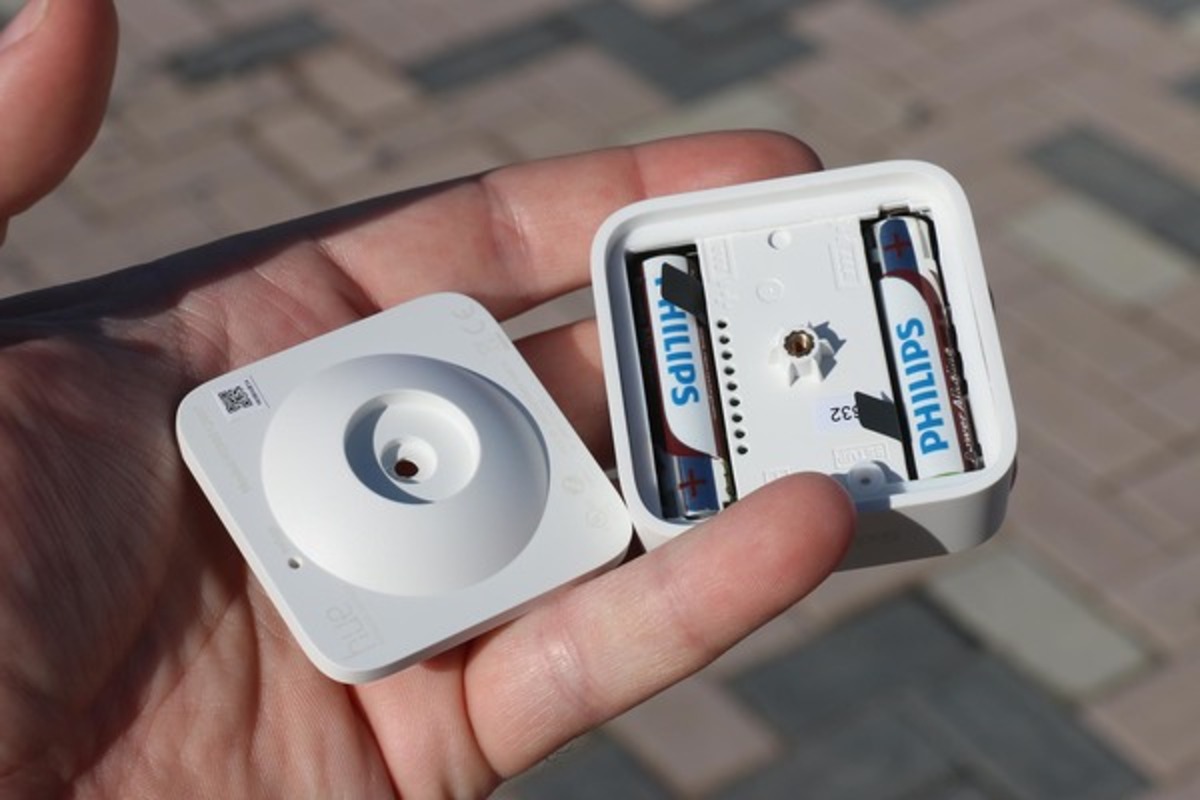
The Philips Hue Motion Sensor relies on two AAA alkaline batteries to power its motion detection and lighting controls. These batteries are designed for long-lasting performance, often lasting months or even years depending on usage. Think of them as the heart of your sensor, ensuring seamless operation without frequent replacements.

How to Replace Your Hue Motion Detector Battery?
Replacing the battery is quick and straightforward. Follow these steps:
- First, locate your Philips Hue Motion Sensor in your home.
- Gently open the back part of the sensor where the battery is.
- Take out the old battery from the sensor. Be careful not to force it.
- Now, grab a new battery and put it in the same spot where the old one was. Make sure it’s placed the right way.
- Once the new battery is in, close the back part of the sensor.
Pro Tip: Use reliable brands like Duracell or Energizer for longer-lasting performance.
Troubleshooting Philips Hue Motion Sensor Battery Issues
If your sensor isn’t working correctly, the battery might be the culprit. Here’s how to identify and fix common battery problems:

Signs of a Low Battery
- Sensor Not Responding: Delayed or no response to motion.
- Lights Misbehaving: Connected lights not turning on or off as expected.
Steps to Troubleshoot
- Ensure the batteries are inserted correctly.
- Try new AAA alkaline batteries to rule out depletion.
- Remove the batteries for a minute, then reinsert them.
- Use the Hue app to check for firmware updates that may resolve performance issues.
How to Maximize Battery Life
Extend the life of your Philips Hue Motion Sensor batteries with these simple tips:
- Avoid Frequent Triggers: Place the sensor away from areas with constant motion, like near pets or curtains.
- Keep in Stable Temperatures: Avoid placing the sensor in extreme heat or cold.
- Adjust Sensitivity: Lower sensitivity settings to reduce unnecessary activations.
- Use Smart Settings: Configure settings to turn off when there’s sufficient natural light.
- Regular Firmware Updates: Keep the sensor updated via the Hue app to optimize performance.

Recommended Battery Brands and Models
For your Philips Hue Motion Sensor, you should use AAA alkaline batteries. Here are some recommended brands and models that are known for their reliability and long-lasting power:
- Duracell: Look for their AAA alkaline batteries. They’re known for a long shelf life and consistent performance.
- Energizer: Their AAA alkaline batteries are also a great choice, offering long-lasting power for your motion sensor.
- Panasonic: Panasonic’s AAA alkaline batteries are reliable and provide a good power source for devices like motion sensors.
When buying batteries, make sure they are labeled as AAA alkaline to ensure your motion sensor works efficiently and stays powered longer.
How to Dispose of Old Hue Sensor Battery
Proper disposal of used batteries is essential:
- ♻️ Recycling Centers: Take your old batteries to a recycling center. They know how to dispose of them safely.
- 🏬 Some Stores Take Them: Sometimes, stores that sell batteries will also take old ones for recycling. So, give that a try!
Boosting Your Sensor’s Battery: Final Tips and Tricks
Keeping your Philips Hue Motion Sensor in top shape means paying attention to its battery. To ensure your Philips Hue Motion Sensor works perfectly and keeps your smart home running smoothly, follow these key points:
- Use AAA alkaline batteries from trusted brands like Energizer and Duracell for optimal performance.
- Change the batteries when needed to maintain functionality. These batteries typically last months to years, depending on usage.
- Always dispose of old batteries responsibly by recycling them.
Frequently Asked Questions
How to check the Hue Motion Sensor Battery Status?
Where can I find information about Hue Outdoor Sensor Battery?
Is there a Philips Hue Motion Sensor Rechargeable Battery available?
Does the Philips Hue motion sensor detect temperature?
What is the range of the Philips Hue motion sensor?


Hashir
Hi, I’m Hashir, a tech enthusiast with a deep love for smart home innovations. My interest in technology has always been driven by the idea of making everyday life more streamlined and efficient. After years of experimenting with smart devices in my own home, I’ve made it my mission to share what I’ve learned with others. I focus on practical, easy-to-understand solutions that anyone can implement to enhance their home. Writing for JustSmarter allows me to connect with fellow tech lovers and help them take their first steps—or next steps—into the exciting world of smart homes.