

Key Takeaways
- To enable/disable Ring’s “You Are Currently Being Recorded” warning:
- Open the Ring app.
- Choose your device.
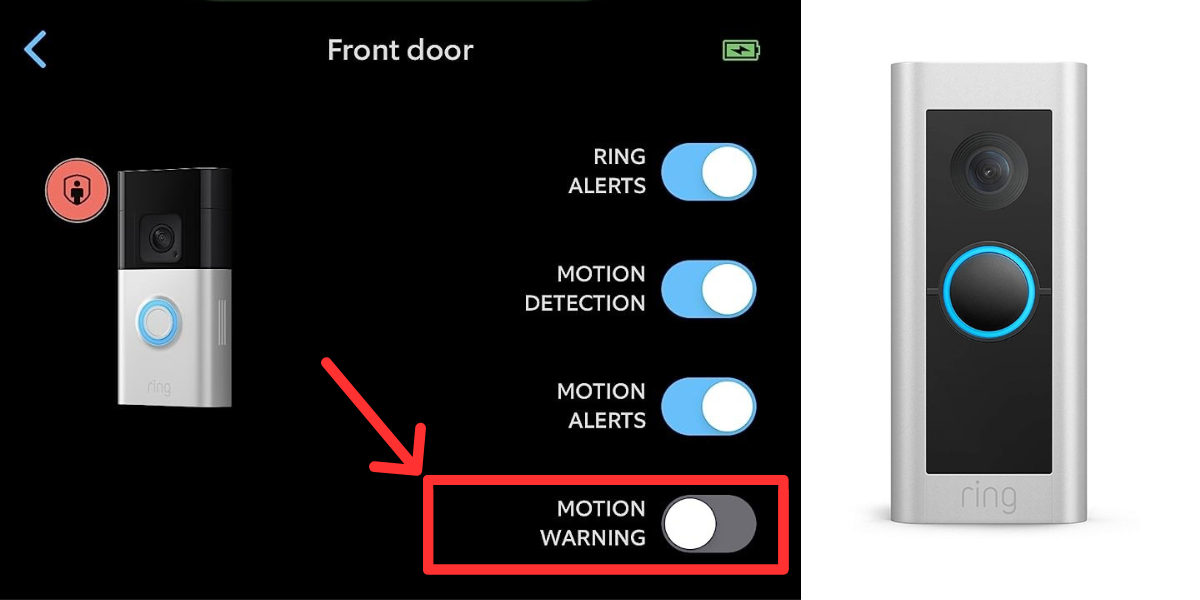
- Toggle ON/OFF the Motion Warning.
- This feature is only available in select countries and on specific wired and plug-in Ring devices.
Need to inform visitors they’re on camera without making it awkward? Some Ring cameras play a “Hi You Are Currently Being Recorded” message when they detect motion. This guide shows you how to easily turn this Ring motion warning on or off.
How to Toggle ON/OFF the Ring You Are Being Recorded Warning
Here’s how to turn off you are being recorded on Ring:
- Open the Ring app on your smartphone or tablet.
- From the upper left-hand corner, open the menu (≡).
- Choose Devices to see a list of your Ring devices.
- Select the specific device you want to adjust. This will bring you to the Device Dashboard.
- Look for the Motion Warning option and toggle it ON or OFF.

- You’ll need to have at least one Motion Zone set up for this feature to work.
If you decide later that you want to turn back on/off the Motion Warning feature, follow the same steps.
What Exactly Is Ring Motion Warning?
The Motion Warning feature on Ring devices is a digital recording that notifies people they are being recorded after they trigger the motion detection. The device’s speaker broadcasts this message. It enhances security by making them aware they’re on camera.
It’s worth noting that this feature is available in several countries, including:
| ✅ The United States | ✅ The United Kingdom |
| ✅ Canada | ✅ Australia |
| ✅ New Zealand | ✅ Isle of Man |
| ✅ Jersey | ✅ Ireland |
| ✅ Malta | ✅ Gibraltar |
However, it is only available on select wired and plug-in Doorbells and security Cameras. If your device is eligible but you can’t see the Motion Warning feature, updating the Ring app might help.
Besides that, the Motion Warning feature is not available on all Ring devices. Some compatible devices include the Ring Video Doorbell Pro, Pro 2, Elite, various models of the Stick-Up Cam, Spotlight Cam, Floodlight Cam, and the Indoor Cam.

When Should You Turn Off the Ring “You Are Being Recorded” Warning?

You might consider turning off the Ring “You Are Being Recorded” warning in these situations:
- Privacy Concerns: If you prefer a quieter, more discreet monitoring setup.
- Frequent Visitors: To avoid alert fatigue for regular visitors, like family or delivery personnel.
- Neighborhood Norms: If your neighbors are uncomfortable with audible alerts.
- Security Strategy: When you want to monitor activity without tipping off potential intruders.
- Legal and Ethical Considerations: If you live in an area where it’s legally required.
What Are the Alternatives to Ring Motion Warning Audio?

These alternatives offer different levels of notification and deterrence without depending solely on Ring’s audible warning. Let’s explore them in more detail:
- 🔖 Physical Signs: Use signs or stickers to inform visitors and deter intruders by indicating surveillance. Ring devices come with branded stickers, or you can use generic “Video Recording in Progress” signs.
- 💡 Motion-Activated Lights: Ring’s Floodlight and Spotlight Cams can light up an area when motion is detected, drawing attention to the camera and deterring trespassers.
- 🎤 Ring Smart Responses: The Smart Responses feature on Ring Video Doorbells plays pre-set audio messages when the doorbell is pressed. It’s interactive but available only on newer models and requires a Ring Protect Plan to review messages.
Note: This feature activates only when the doorbell is pressed, not just by motion.
Here’s how to turn on Ring Quick Replies:
- Open the Ring app and tap the menu (≡) > Devices.
- Select your Doorbell.
- Tap the Smart Responses > Quick Replies.
- Turn on Quick Replies.
- Set Response Time and choose a Quick Reply Message.
- Lastly, tap Save in the top right corner.
Optimizing the Ring Motion Warning Message
While I prefer to keep the “Hi, You Are Currently Being Recorded” alert ON, you might find yourself in a situation where it’s better to keep it off. So, it all comes down to your security and privacy needs. Here’s more you can do to enhance your security and privacy:
- Considering putting up a Ring Doorbell sticker instead.
- Make sure that as a neighbor, your Ring Doorbell shouldn’t look into someone’s private property and vice versa.
- Learn more about Ring in this Ring Camera FAQ Guide.
Frequently Asked Questions
Why does my Ring Doorbell say “Hi you are currently being recorded”?
How do you know if a Ring is recording you?
Which camera says you are currently being recorded?
Do any other devices support the motion warning feature?


Hashir
Hi, I’m Hashir, a tech enthusiast with a deep love for smart home innovations. My interest in technology has always been driven by the idea of making everyday life more streamlined and efficient. After years of experimenting with smart devices in my own home, I’ve made it my mission to share what I’ve learned with others. I focus on practical, easy-to-understand solutions that anyone can implement to enhance their home. Writing for JustSmarter allows me to connect with fellow tech lovers and help them take their first steps—or next steps—into the exciting world of smart homes.