


Key Takeaways
Your Ring Camera night vision may not work due to:
- Disable Night Vision.
- Insufficient Ambient Light.
- Dirty or Blocked Lens.
- Infrared Light Reflection.
- Bad Camera Placement.
- Firmware or App Issues.
To fix your Ring Camera night vision not working:
- Enable Night Vision in the Ring app.
- Clean your camera lens and remove obstructions.
- Place a small light source nearby to help the camera.
- Reposition the camera to avoid infrared reflections.
- Update the Ring app and camera firmware.
- Reset your Ring Camera through the app.
Is your Ring Camera’s night vision not working? Check if it’s turned on in the app. If it’s on but you still see a dark screen, it could be due to camera settings or environmental factors. In this guide, I’ll cover the common reasons and easy fixes for dark footage at night.
Why Is My Ring Camera Night Vision Not Working?

Your Ring Camera’s night vision may not work due to several factors:
- 🔧 Night Vision Turned Off in App Settings: If Night Vision is disabled in your Ring app settings, the camera won’t switch to infrared mode when it gets dark.
- 🌙 Insufficient Ambient Light or Glare: Insufficient light or glare can interfere with your Ring Camera’s night vision, affecting performance.
- 🧼 Obstructions on the Camera Lens: Dirt or objects on the lens can block the infrared sensors and disrupt night vision.
- 📏 Incorrect Camera Positioning: Poor positioning, like facing bright areas or being obstructed, can prevent night vision from activating.
- ⚙️ Hardware Malfunctions: Technical issues, such as faulty hardware or malfunctioning infrared sensors, can also cause night vision to stop working.
How to Fix Ring Camera Night Vision
It’s not impossible to fix your Ring Camera night vision not working issue. Below, I’ve explained in detail all the tricks that have helped me make night vision work on my camera:
1. Enable Night Vision
First things first, ensure that the Night Vision feature on your Ring Camera is activated. It’s a simple check that can sometimes be overlooked.
Here’s how to enable Night Vision in the Ring app:
- Open the Ring app on your device.
- Tap on the menu (three lines) and select the Ring Camera you want to adjust.
- Tap Device Settings, then select Video Settings.
- Go to the Night Vision feature and make sure it’s set to Auto or On.
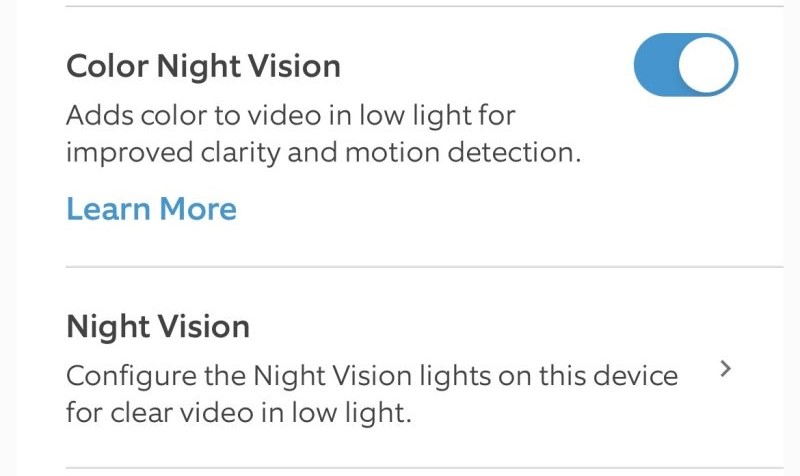
If the night footage on your Ring Camera seems washed out, it’s probably due to the color balance. To fix it:
- Open the Ring app on your device.
- Tap on the menu (three lines) and select the Ring Camera you want to adjust.
- Go to Device Settings and then Video Settings.
- Toggle on the Color Night Vision switch.

2. Keep the Camera Lens and View Clear
To ensure optimal performance of your Ring Camera’s night vision, you must maintain a clear view. Here’s how to keep the camera lens and view unobstructed:
- Clean the lens regularly using a microfiber cloth to remove dust, dirt, or condensation.
- Check for obstructions like plants, spider webs, or other objects that might block the view.
- Ensure no objects reflect light in the camera’s view, as this can interfere with night vision.
- Avoid direct exposure to weather by positioning your Ring Camera under a cover or using a weatherproof housing.

3. Balance External Lighting
Getting the external lighting right can significantly enhance your Ring Camera’s night vision without messing with its sensors.
Here are some easy steps to adjust your external lighting:
- Make sure no lights are shining directly into the camera to prevent glare that can affect night vision.
- Switch to lower-intensity or adjustable lights. Softer lighting can improve night vision without overwhelming the sensors.
- Adding a dimmer to your outdoor lights lets you fine-tune brightness, helping the camera see better at night without being blinded.

4. Optimize Video Quality
Optimizing video quality can enhance your Ring Camera’s night vision performance. Better video quality helps the camera capture clearer images, especially in low-light conditions.
Here’s how to do it:
- Open the Ring app and select your Camera.
- Go to Device Settings and tap Video Settings.
- Adjust the Video Quality to a higher setting if available, ensuring clearer night vision footage.
- Ensure your Wi-Fi connection is strong for smooth streaming and optimal video quality.
5. Update Your Ring App and Camera Firmware
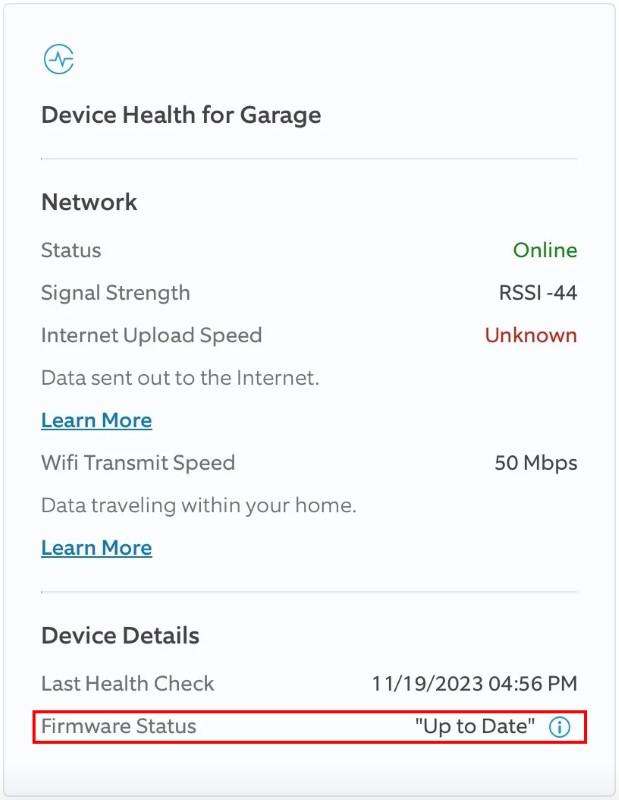
Keeping your Ring app and Camera firmware updated is crucial for optimal performance. Regular updates fix bugs and improve features like night vision. Here’s how to do it:
- Update the Ring app – Go to your phone’s app store and check for any available updates for the Ring app. Install the latest version.

- Check for firmware updates – Open the Ring app, select your Camera, go to Device Settings, and check for firmware updates under General Settings.
6. Reset Your Ring Camera
⚠️ Warning: Resetting your Ring Camera will restore it to factory settings and you’ll have to set it up again in the Ring app.
If other solutions don’t work, resetting your Ring Camera can help resolve night vision issues. Here’s how to reset it:
- Find the reset button. It is usually on the back or bottom of the camera.
- Press and hold the reset button for 15–20 seconds until the camera’s light starts flashing.
- Release the button and wait for the camera to restart.
- Reconfigure the camera in the Ring app by following the setup instructions.
Restore Your Ring Camera’s Night Vision
To get clear Ring Camera footage at night, make sure night vision is turned on, keep the lens clean, and adjust outdoor lights to reduce glare. If all else fails, a quick reset should do the trick.
Here are more articles on Ring Camera you may find interesting:
- If your Ring Camera turned pink, purple, or green, adjust its position, clean the lens, update the firmware, and check for broken parts.
- View multiple Ring Cameras by logging into Ring.com, using SmartThings, or separate devices for different feeds.
- You cannot turn off infrared on Ring Camera and Doorbell except for the Ring Doorbell Pro 2.
Frequently Asked Questions
Why is my Ring indoor camera night vision not working?
Is there any Ring night vision update?
How to turn off night mode in Ring doorbell?
1. Open the Ring app.
2. Select Devices and choose your Ring doorbell.
3. Go to Device Settings, then Video Settings.
4. Here, you can toggle the Color Night Vision on or off, depending on your preference. This will affect how the device uses night mode under various lighting conditions.


Hashir
Hi, I’m Hashir, a tech enthusiast with a deep love for smart home innovations. My interest in technology has always been driven by the idea of making everyday life more streamlined and efficient. After years of experimenting with smart devices in my own home, I’ve made it my mission to share what I’ve learned with others. I focus on practical, easy-to-understand solutions that anyone can implement to enhance their home. Writing for JustSmarter allows me to connect with fellow tech lovers and help them take their first steps—or next steps—into the exciting world of smart homes.

![wyze camera black ]](https://justsmarter.net/wp-content/uploads/2024/05/wyze-camera-black--380x250.webp)