Key Takeaway:
- Wyze cameras are cheap due to low-cost manufacturing and direct sales.
- Features include night vision, motion detection, and HD video quality.
- Common issues include connectivity problems and app glitches.
- Wyze provides good value for cost-effective home security.
Best affordable Wyze security cameras include:
As someone who values smart home security but not the hefty price tags that often come with it, I understand the allure of Wyze cameras. They’re surprisingly affordable, but with their low price point, one can’t help but wonder if Wyze cameras are actually worth it. Let’s explore why Wyze cameras are so cheap and see whether it’s a compromise on quality or truly value for money.
Why Are Wyze Cameras So Cheap?
Wyze cameras are affordable due to manufacturing in low-cost regions like China, Vietnam, and Taiwan, and using licensed components from companies like Sony. This strategic approach allows Wyze to offer quality smart home devices at significantly lower prices than competitors.

Wyze was founded by former Amazon employees who aimed to democratize technology by making smart home devices accessible at lower prices. Their background in a technology-driven company like Amazon gave them the necessary insights and skills to disrupt the smart home market effectively.
How Much Do Wyze Products Cost?
Wyze products are priced affordably, with security cameras ranging from about $27 to $83, doorbells between $30 and $50, thermostats around $70 to $80, and lighting solutions from $10 to $40 depending on the package.
Originally focused solely on cameras, Wyze has since expanded its product lineup to include a variety of smart home products such as doorbells, thermostats, and lighting solutions. Here’s an estimate of the price range for different Wyze products:
📹 Smart Security Cameras: Prices range from about $27 for the Wyze Cam OG to $40 for the Wyze Cam Pan V3. The higher-end Wyze Battery Cam Pro 2K starts at around $83.
🔔 Doorbell: The Wyze Video Doorbell typically costs $30 to $50, depending on the model and features.
🌡️ Thermostats: The Wyze Thermostat, which allows for easy integration with most home heating and cooling systems, is priced around $70 to $80.
💡 Lighting Solutions: Wyze offers smart light bulbs and light strips, with prices ranging from $10 for a single bulb to around $30 to $40 for multi-pack setups or advanced light strips.
Wyze Subscription Plans
Wyze offers various subscription plans. “Cam Plus” costs $2.99 monthly, offering advanced detections and 14-day cloud storage. The “Cam Plus Lite” has a flexible price, focusing on person detection. The “Cam Unlimited” plan is $9.99 monthly, covering all cameras with enhanced features.
These plans include:
| Features | Basic | Cam Plus | Cam Protect |
|---|---|---|---|
| Cost | Free | $2.99/month per camera$9.99/month for unlimited cameras | $3.99/month per camera |
| Motion-Alert Delay | 5 minutes | None | Includes all Cam Plus features |
| Motion-Triggered Alerts | Yes | Yes | Yes |
| Sound-Triggered Alerts | Yes | Yes | Yes |
| Smoke & CO Sound-Triggered Alerts | Yes | Yes | Yes |
| Cloud Video Recording | No | Yes | Yes |
| Person Detection | No | Yes | Yes |
| Package Detection | No | Yes | Yes |
| Vehicle Detection | No | Yes | Yes |
| Pet Detection | No | Yes | Yes |
| Event Fast-Forwarding | No | 2x and 4x | Yes |
| Friendly Faces | Not applicable | Not applicable | Detects family members or friends |
| Smart Vision | Not applicable | Not applicable | AI can recognize if a door is open or closed |
| Emergency Dispatch | Not applicable | Not applicable | 24/7 professional monitoring |
What Features Do Wyze Cameras Offer?
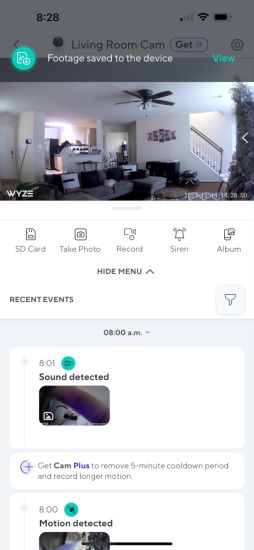
Wyze cameras enhance home security with features like high-quality video, enhanced night vision, two-way audio, and motion detection. They also offer local and cloud storage options, built-in sirens, and seamless integration with smart home systems like Alexa and Google Assistant.
Here are some features I love about Wyze cameras:
🎥 High-Quality Video: The Wyze Cam v4, one of the models I use, offers a 2.5K QHD resolution. It delivers super-clear video that captures every detail, which has been crucial for both general security and checking in on finer details around my property.
🌙 Enhanced Color Night Vision: This feature provides crystal-clear footage even in low-light conditions. I can review detailed nighttime videos, which is reassuring when I hear strange noises after dark.
🗣️ Two-Way Audio: I often use this feature to communicate with delivery people or to soothe my dog if he’s anxious when I’m not home. The two-way audio via the Wyze app makes it feel like I’m there, even when I’m miles away.
🔊 Motion and Sound Detection: My Wyze cameras alert me to any movement or noise, which includes detecting when people, vehicles, or even packages are near my door. This immediate notification system helps me stay aware of my surroundings without needing to constantly monitor the feeds.
🚨 Built-in Siren: Some of my Wyze cameras come with an integrated siren that I can activate manually or set to trigger automatically upon detecting motion.
💾 Local and Cloud Storage: I appreciate having options for video storage. The local storage on a microSD card is great for saving clips without recurring costs. Additionally, I have subscribed to the Cam Plus service for cloud storage. It includes full-length video recordings without any cooldown periods.
🏠 Smart Home Integration: The compatibility with Alexa and Google Assistant has seamlessly integrated these cameras into my smart home system. I can activate or check the cameras through simple voice commands, which is incredibly convenient.
What Are The Common Issues With Wyze Cameras?
I’ve faced issues with Wyze cameras, particularly connectivity problems and app glitches. Ensuring a strong Wi-Fi connection, logging in and out of the app, regular firmware updates, and resetting the camera help overcome these challenges and improve live stream access.
Here’s what I’ve encountered and some tips that might help:
📶 Connectivity Challenges: At times, my Wyze cameras struggle to connect to the live stream when I’m not on my local Wi-Fi network. This has been a common issue with both my iOS and Android devices. To resolve this, make sure to have a stable and strong Wi-Fi connection.
🔄 App Glitches: There have been occasions where I had to log out and then log back into the Wyze app to refresh the connection and functionality. This seems to resolve temporary glitches but can be a bit of a hassle when I need quick access to my camera feeds.
⏳ Live Stream Loading Failures: My Wyze cam sometimes just won’t load the live stream properly, or it disconnects after a few minutes. This can be frustrating, especially when I’m trying to monitor something important in real-time. Regular firmware updates have somewhat alleviated this issue.
🕒 Camera Responsiveness: Initially, my Wyze cam would connect without any issues, but then it would freeze or not respond at all, showing 0 KB/s despite having a good Wi-Fi signal. I found that resetting the camera and checking for software updates often helps regain functionality.
🔗 Intermittent Live View Access: There have been days when accessing the live view on my camera was hit or miss. On days like these, I double-check my network settings and restart my router, which sometimes helps establish a more stable connection.
Best Affordable Wyze Cameras
The best affordable Wyze cameras—Wyze Cam OG, Wyze Cam Pan V3, and Wyze Cam V4—offer high-quality video, excellent night vision, and seamless two-way audio. Each model excels with unique features like 360-degree coverage and 2.5K HD resolution despite some connectivity challenges.
1. WYZE Cam OG

My first pick was the Wyze Cam OG. I was curious to see how this budget-friendly camera would hold up against more expensive models. From the start, it was amazing. This cam offers crisp 1080p video quality, which I found more than adequate for keeping an eye on my home’s interiors.
The night vision offers clear images even in total darkness, which is crucial for those middle-of-the-night checks. I also appreciated the two-way audio feature, which allowed me to communicate with my family and pets from anywhere using the Wyze app.
However, the camera sometimes struggled with Wi-Fi connectivity, which occasionally caused delays in notifications or video streaming. This was typically manageable by ensuring a strong Wi-Fi signal throughout my home or opting for a network booster in areas with poor coverage.
Pros and Cons
- High-quality 1080p video
- Effective night vision
- Two-way audio
- Easy setup and use
- Occasional Wi-Fi connectivity issues
- Delayed notifications
2. WYZE Cam Pan V3
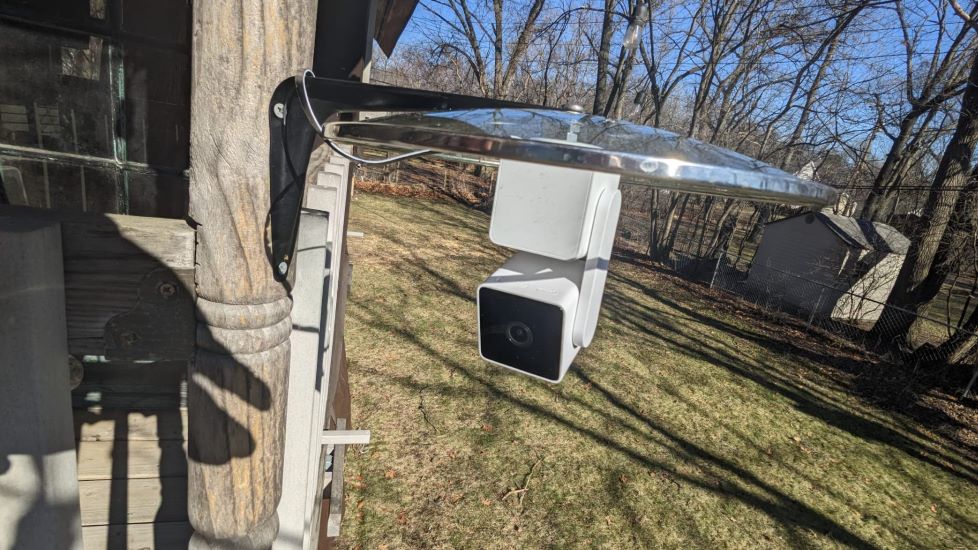
I have also used the Wyze Cam Pan V3. This budget-friendly camera packs an impressive suite of features. For example, it stood out with its 360-degree coverage, which allowed me to monitor an entire room without blind spots.
The pan and tilt features were exceptionally smooth and responsive. Because of this, tracking movements in real time became easy. This was something I found invaluable when monitoring my busy living space. Moreover, the color night vision is a significant upgrade. It offered clear and vivid images even under minimal lighting conditions.
While the tracking is generally reliable, I noticed occasional hiccups where it would lose focus on a moving object, especially in highly dynamic environments. Also, like many wireless cameras, it requires a stable Wi-Fi connection for optimal performance. I’d recommend placing it within a good range of your router or investing in a Wi-Fi extender if your home has dead spots.
Pros and Cons
- 360-degree coverage with pan and tilt
- High-quality color night vision
- Responsive real-time tracking
- Can lose track of fast-moving objects
- Dependent on strong Wi-Fi connection
3. Wyze Cam V4
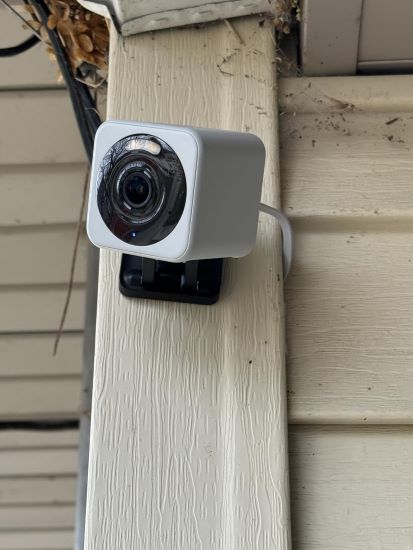
Lastly, I added the super amazing Wyze Cam V4 into my smart home setup. It delivers an outstanding 2.5K HD video resolution, which I found crucial for capturing sharp, detailed images. The enhanced color night vision was a standout feature. It enables vivid video capture even in extremely low-light conditions. I added a spotlight near the camera for improved visibility and deterred unwanted visitors after dark.
Moreover, the two-way audio feature allowed me to interact seamlessly with visitors. Setting up the camera was straightforward, and integrating it with my existing smart home ecosystem was hassle-free, thanks to its compatibility with both Alexa and Google Assistant.
However, I noticed that during particularly windy days, the motion detection could be overly sensitive and trigger unnecessary notifications. To fix this, I adjusted the sensitivity settings. It requires a bit of tweaking to get right, depending on your environment.
Pros and Cons
- High-quality 2.5K HD video
- Color night vision with a spotlight
- Two-way audio
- Easy setup and integration
- Overly sensitive motion detection in windy conditions
How Is Wyze So Cheap? Final Words
In my experience, Wyze impressively balances affordability with functionality. Their strategic manufacturing and use of quality components allow them to offer reliable smart home devices at low prices. Despite some connectivity issues, Wyze provides great value with reliable home security features.
Here are more articles you may find interesting:
- How To Fix the “Wyze SD card not available” Error?
- The Ultimate Guide to Thread and Matter Light Bulb
- Which is the Best Continuous Recording Security Camera: The Top 7 in 2024
Frequently Asked Question
Does Wyze offer good quality and performance for its affordable price?
Do Wyze cameras record sound?
How far can a Wyze camera see?
Who owns Wyze?
Are Wyze cameras better than Ring cameras?