Key Takeaways:
- Both 1st and 2nd generation Ring motion sensors typically last about a year on a single battery, depending on usage and environmental factors.
- Frequent motion detection in high-traffic areas, weak signal strength, cold weather, and old batteries can make your sensor’s battery drain faster.
- To prevent Ring Motion Detector battery from draining fast:
- Relocate sensors to less busy areas or adjust sensitivity settings.
- Improve signal strength by optimizing Ring Bridge placement or using a Z-Wave range extender.
- Use lithium batteries for better performance in cold weather.
- Regularly check battery levels via the Ring app and keep spare batteries on hand for timely replacements.
If you’re like me and love diving into the latest tech gadgets, you’ve probably got a Ring motion sensor or two around your home. In this post, I’m going to share my experiences and tips about Ring motion sensor battery, so you can keep your home security running smoothly without any hiccups.
How Long Does a Ring Motion Sensor Battery Last?
A Ring motion sensor battery typically lasts for approximately one to three years, depending on the usage frequency and the sensor’s exposure to extreme temperatures, which can affect battery life.
Here’s what I observed using Ring Motion sensors:
Ring Motion Sensor (1st Generation) Battery Life
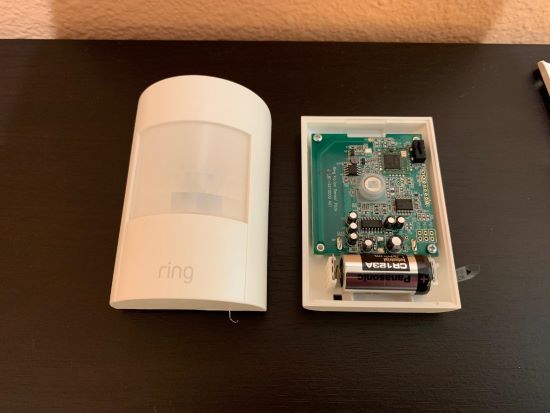
From my experience of using the first-generation Ring motion sensors, they usually last about a year on a single battery. This might vary depending on how busy the area is where you’ve installed them. High-traffic zones mean the sensor is working more, and thus, the battery might drain faster.
Ring Motion Sensor (2nd Generation) Battery Life

Now, onto the second-generation sensors. These guys have a similar battery life to the first-gen ones, generally around a year. However, they’ve got some efficiency tweaks that might give you a bit more juice if you’re lucky. Again, it depends on the location and how often they’re triggered.
Why My Ring Sensor Battery Keeps Dying?
Your Ring sensor battery may be draining quickly due to frequent activation, cold weather exposure, or the use of non-optimal battery types. Ensuring proper placement and using recommended batteries can help extend battery life.
To understand what makes your Ring Motion Sensor battery drain faster and what you can do about it, read on:
🚶♂️🚗 High Traffic Areas
If you’ve placed your sensor in a spot with constant movement, it’s going to use up more power. This is because the sensor is frequently detecting motion, which activates the device more often than in low-traffic areas. Here are a couple of things you can do to prevent Ring Motion Detector battery drainage:
1. Relocate the Sensor: Move the sensor to a less busy area where there’s less frequent movement.
2. Adjust Sensitivity Settings: Lower the sensitivity settings in the Ring app to reduce the number of times the sensor activates. Following these steps–
- Open the Ring app and tap the Menu (≡) option (top left).
- Tap Devices.
- Select your Motion Sensor.
- Tap Motion Settings > Motion Sensitivity.
- Drag the Motion Sensitivity Slider to a lower setting.
📶❌ Weak Signal
If the sensor struggles to connect to the Ring Bridge, it will drain the battery quicker. A weak signal forces the sensor to use more power to maintain the connection. To make sure your Ring Sensor battery doesn’t struggle with a weak Wi-Fi signal, here are a few things you can do:
Improve Signal Strength:
- Ensure your Ring Bridge is centrally located.
- Reduce the distance between the sensor and the Ring Bridge.
- Avoid physical obstructions like walls or large metal objects between the sensor and the Bridge.
Add a Range Extender to boost the signal:
- Purchase a compatible Z-Wave range extender.
- Plug in the extender halfway between the Ring Bridge and the motion sensor.
- Follow the setup instructions provided with the extender to connect it to your Ring system.
❄️🧣 Cold Weather
Low temperatures can significantly reduce battery efficiency. I’ve noticed this especially during harsh winters, where battery performance drops due to the cold. Here are a few things that have helped me improve my Ring Motion Detector battery life in colder seasons:
1. Insulate the Sensor: Use weather-resistant covers or enclosures to shield the sensor from extreme cold.
2. Use Lithium Batteries: Lithium batteries perform better in cold weather compared to alkaline batteries. So, replace the existing battery with a high-quality lithium battery.
🔋👵 Old Batteries
Batteries degrade over time. If you’re using rechargeable ones, they might not hold a charge as well as they used to, leading to quicker depletion.
1. Regular Replacement: Replace the batteries regularly to ensure optimal performance.
2. Use High-Quality Batteries: Invest in high-quality, brand-name batteries for better longevity.
What Type of Battery Does a Ring Motion Sensor Use?
A Ring motion sensor typically uses CR123A lithium batteries. These 3-volt batteries are known for their long-lasting performance and are commonly recommended for optimal operation of the sensor.
Here’s a quick rundown:
1st Generation: These use a 3V lithium battery.
2nd Generation: These typically use a CR123A lithium 3V battery, which are reliable and have a long shelf life.

How to Choose the Right Battery for your Ring Motion Sensor:
You basically have two choices:
- Lithium Batteries: They are ideal for cold weather and have a longer shelf life. They are more expensive but provide better performance.
- Alkaline Batteries: These are cheaper and readily available, but they may not perform as well in extreme temperatures and tend to have a shorter lifespan compared to lithium batteries.
How to Store Ring Sensor Battery Properly:
These two practices help me keep my spare Ring Motion Detector batteries safe and effective:
- Store batteries in a cool, dry place to extend their shelf life.
- Avoid storing batteries in extreme temperatures, as this can reduce their effectiveness.
How to Replace a Ring Sensor Battery?
To replace a Ring sensor battery, first remove the sensor cover, then carefully take out the old battery. Insert the new CR123A lithium battery, ensuring correct orientation, and replace the cover to secure it.
This is where things get interesting. Ring motion sensors don’t use rechargeable batteries. Instead, you’ll need to replace the battery when it’s drained.
Replacing the battery is straightforward. Here’s how I do it:
- Remove the Sensor by gently taking it off its mount.
- Open the Battery Compartment (depending on your model, you might need a small screwdriver).
- Take out the old battery and pop in a new one, making sure it’s oriented correctly.
- Close the battery compartment and remount the sensor.
All About Ring Motion Sensor Battery
Keeping your Ring motion sensors running smoothly is key to maintaining your home security. Regularly check and replace the batteries when needed. And always keep spare batteries on hand to ensure your sensors are always operational.
Here are more smart home guides you may find interesting:
- Got Your Ring Sensor Offline? Here’s How To Fix It!
- Got Your Ring Motion Sensor Tampered? Do This
- How to Remove Ring Contact Sensor?
- All You Need To Know About Ring Professional Monitoring
Hope this helps! Feel free to drop more questions and favorite tips in the comments!
Frequently Asked Questions
Are Ring motion sensors rechargeable?
How to know your Ring Motion Detector battery level?
How is Ring motion sensor (2nd generation) battery replacement done?
How long is the Ring Alarm battery life?